
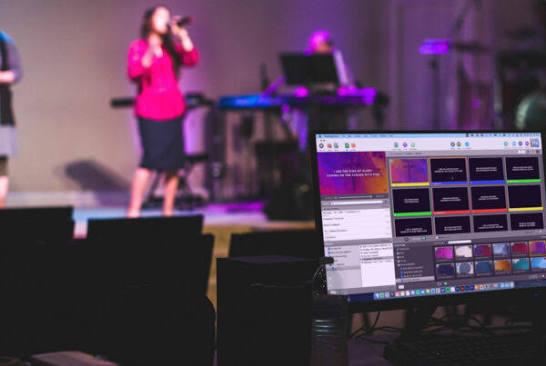
In modern ministry, church presentation software is no longer just a digital hymnbook for projecting song lyrics onto a sanctuary wall. Today’s church media teams are expected to display Scripture passages in split seconds, run lower-thirds for YouTube and Facebook live streams, manage stage countdown timers, and switch smoothly between announcements and sermon slides—all without distracting the congregation.
Whether you are serving in a growing parish running on a single Windows laptop or coordinating a multi-screen sanctuary production, choosing the right projection tool determines how smoothly your Sunday service flows. Below is a practical, honest breakdown of the 10 best church presentation software options for 2026, covering both industry-standard paid platforms and dependable free, open-source alternatives.
Quick Comparison of the Top 10 Church Presentation Tools
| Software | Pricing Model | Best For | Works Offline? | Platforms |
| ProPresenter 7 | Paid (Subscription/Licence) | Large churches & live-stream lower-thirds | Yes | Mac, Windows |
| EasyWorship 7 | Paid (Subscription) | Medium churches & quick volunteer training | Yes | Windows |
| MediaShout 7 | Paid (One-time / Sub) | Heavy Scripture & sermon-focused ministries | Yes | Windows, Mac |
| Faithlife Proclaim | Paid (Subscription) | Remote teams & cloud collaboration | Partial (Syncs) | Windows, Mac |
| FreeShow | 100% Free (Open Source) | Modern features on a zero budget | Yes | Windows, Mac, Linux |
| OpenLP | 100% Free (Open Source) | Small churches & older Windows laptops | Yes | Windows, Mac, Linux |
| VideoPsalm | 100% Free | Fast Bible projection & multilingual songs | Yes | Windows |
| Worship Extreme | Freemium / Paid | Simple cloud-synced slide decks | Partial (Syncs) | Windows, Mac |
| SongShow Plus | Paid (Subscription) | Advanced visual effects & custom transitions | Yes | Windows |
| Canva + PowerPoint | Free / Freemium | Small fellowships & fellowship halls | Yes (PowerPoint) | Web, Windows, Mac |
Paid Industry-Standard Options
1. ProPresenter 7 (Renewed Vision) — Best Overall for Complex Media
For churches running multiple screens—such as a main congregation projector, a stage confidence monitor for the choir, and clean lower-thirds for live streams—ProPresenter 7 remains the global benchmark.
-
Key Strengths: True multi-screen output, native NDI and SDI support for OBS/vMix rigs, motion backgrounds, and seamless CCLI SongSelect integration.
-
Limitations: Higher learning curve for first-time volunteers, and it performs best on a dedicated graphics card or an Apple Silicon Mac rather than a budget laptop.
2. EasyWorship 7 — Best for Traditional and Medium-Sized Churches
If your media booth rotates between different volunteers every Sunday, EasyWorship 7 is one of the easiest professional tools to master. Its layout is clean, predictable, and built specifically to prevent live-service panics.
-
Key Strengths: Fast searchable song database, built-in Bible translations, smooth drag-and-drop scheduling, and reliable dual-monitor output.
-
Limitations: Windows-only, and less flexible than ProPresenter if you need complex multi-layer broadcast graphics.
3. MediaShout 7 — Best for Scripture-Heavy Teaching Ministries
Built from the ground up for church sanctuaries, MediaShout 7 excels when your pastor moves rapidly between multiple Bible passages and cross-references during a sermon.
-
Key Strengths: Rapid Scripture lookup across multiple translations, clean slide templates, and dedicated ministry-focused customer support.
-
Limitations: The interface feels slightly less modern than newer cloud-first platforms, though it remains remarkably stable during live services.
4. Faithlife Proclaim — Best for Cloud Collaboration
When your pastor, worship leader, and media coordinator live across town and only meet on Sunday morning, Faithlife Proclaim removes the Saturday-night flash-drive scramble. Everything syncs in the cloud so team members can build the service order from home.
-
Key Strengths: Real-time cloud syncing, automatic sermon audio recording, mobile remote control, and direct integration with Logos Bible Software.
-
Limitations: Requires a reliable internet connection to sync updates before service starts.
5. SongShow Plus — Best for Visual Polish and Transitions
SongShow Plus is a long-standing Windows platform favoured by churches that want rich visual transitions, custom slide animations, and deep control over how lyrics appear on screen.
-
Key Strengths: Extensive visual effects library, dependable Scripture projection, and flexible slide formatting.
-
Limitations: Windows-only, and its older menu structure can take new volunteers a couple of weeks to navigate comfortably.
Free and Budget-Friendly Alternatives
6. FreeShow — Best Free Modern Alternative to ProPresenter
FreeShow has quickly become the standout free, open-source church presentation software for 2026. It delivers a modern dark interface, stage display support, NDI output for live streaming, and customizable templates—without a monthly subscription fee.
-
Key Strengths: Completely free, actively updated, works 100% offline, and supports Windows, Mac, and Linux.
-
Limitations: Because it is packed with modern features, give your volunteers one midweek rehearsal to get comfortable before using it on a Sunday morning.
7. OpenLP — Best Free Option for Older Laptops
If your church operates on a modest Windows laptop with limited RAM, OpenLP is lightweight, stable, and battle-tested in thousands of congregations worldwide.
-
Key Strengths: 100% free and open source, imports songs from multiple formats, includes a built-in Bible module, and offers a mobile remote app over local Wi-Fi.
-
Limitations: Basic visual design compared to FreeShow or ProPresenter, and fewer native live-stream overlay tools.
8. VideoPsalm — Best Free Tool for Bilingual and Multilingual Churches
For churches that sing in English alongside Yoruba, Igbo, Hausa, French, or Pidgin, VideoPsalm is a hidden gem. It is completely free for Windows and handles multiple songbooks and Bible versions effortlessly.
-
Key Strengths: Instant Bible verse projection, clean background themes, offline reliability, and zero licensing cost.
-
Limitations: Available only on Windows.
9. Worship Extreme (Presenter) — Best Freemium Cloud Option
Worship Extreme offers a generous free tier for smaller churches alongside affordable paid upgrades. Its clean interface makes building a Sunday playlist straightforward even for teenage volunteers.
-
Key Strengths: Cloud-synced song library, easy learning curve, and clean mobile remote control.
-
Limitations: Advanced features like stage displays and unlimited cloud storage require a paid plan.
10. PowerPoint Paired with Canva — Best for House Fellowships and Church Plants
If you are just planting a church or running a campus fellowship, do not let software complexity slow you down. Designing clean announcement slides in Canva and exporting them into Microsoft PowerPoint is simple, familiar, and completely offline-ready.
(Need more free tools for your church’s online ministry? Read our guide to the 5 essential apps for every church social media manager and our roundup of 100% free open-source video editors for churches.)
How to Choose the Right Software for Your Church
Before paying for an annual licence or downloading a new programme, run through these four practical checks—especially if your church operates with rotating volunteers and variable internet access:
-
Test Offline Reliability First: Never rely on a tool that freezes if your church Wi-Fi drops mid-sermon. Prioritise offline-first software like EasyWorship, FreeShow, OpenLP, or VideoPsalm.
-
Match the Software to Your Computer: ProPresenter 7 is unmatched, but it will lag on an older 4GB RAM laptop. If your hardware is modest, OpenLP or VideoPsalm will give you a far smoother Sunday experience.
-
Factor in Volunteer Training: The best software in the world fails if only one person knows how to operate it. Pick a platform that a new volunteer can learn in 30 minutes during Saturday rehearsal.
-
Plan for Live Streaming: If your church broadcasts on YouTube or Facebook, ensure your chosen tool supports lower-thirds or NDI output so online viewers can read lyrics and scriptures clearly. You can also streamline your sermon notes and media planning using the free AI tools for church media teams we reviewed earlier.
Frequently Asked Questions
What is the best free church presentation software for 2026?
FreeShow is the best overall free option if you want modern features, stage displays, and live-stream support. If you are running an older Windows laptop and want maximum simplicity, OpenLP or VideoPsalm are the most dependable choices.
Which church presentation software works completely offline?
ProPresenter 7, EasyWorship 7, MediaShout 7, FreeShow, OpenLP, and VideoPsalm all run 100% offline once your song library and Bible translations are downloaded onto the projection computer.
Do I need a Mac to run church presentation software?
No. While many large churches run ProPresenter on Mac computers, EasyWorship, MediaShout, VideoPsalm, FreeShow, and OpenLP all run reliably on standard Windows laptops.
Final Thoughts
Great church media is invisible—it serves the worship and the Word without ever drawing attention to itself. You do not need to strain your church budget to achieve a clean, distraction-free sanctuary screen. Start with a tool that matches your hardware and your volunteers’ skill level, rehearse your slides before Sunday morning, and upgrade only when your ministry outgrows your current setup.
JOIN OUR WHATSAPP CHANNEL FOR MORE GOSPEL NEWS UPDATES AT FIRST HAND